For VAS Internal Use: Add Animals in Batch Instructions
A simplified version of these instructions exists in the Excel file: 
Follow these steps to add required and optional details about your animals. To view this topic in the PULSE Platform Online Help, click here.
Permissions Required to Use this Feature: Herd Write permission is required to use this feature. See Edit User Permissions if you need help updating user permissions.
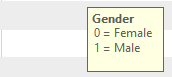
The XLSX template includes tips to help you add your animal data. Click the cell to see the tip:
- Add required data for all animals. Required fields are bolded in the template.
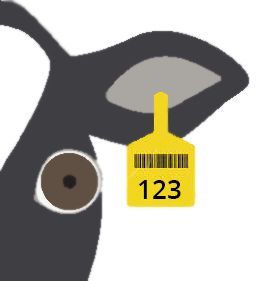
- CowNumber: Number assigned to the animal, usually visible on the eartag:

- Breed: Two-letter abbreviation for the animal's breed. Common Cow breeds include the following: HO = Holstein; JE = Jersey; AY = Ayershire; BS = Brown Swiss; GS = Guernsey; MS = Milking Shorthorn; XB = Beef cross-breed; XD = Dairy cross-breed
- BirthDate: Animal's date of birth (any format)
- Gender: 0 = female; 1 = male
- Lactation: Current lactation number. Enter 0 for heifers and bull calves.
- PenNumber: Animal's pen number
- CowNumber: Number assigned to the animal, usually visible on the eartag:
- Enter additional required details for cows:
- FreshDate: Date of FRESH event (calving) for the current lactation
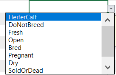
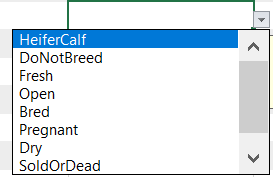
- ReproductionCode: Use the drop-down to select the cow's reproduction status, which automatically translates to a code:
- Add optional data.
 See all optional fields here
- CowName: Common name for the animal
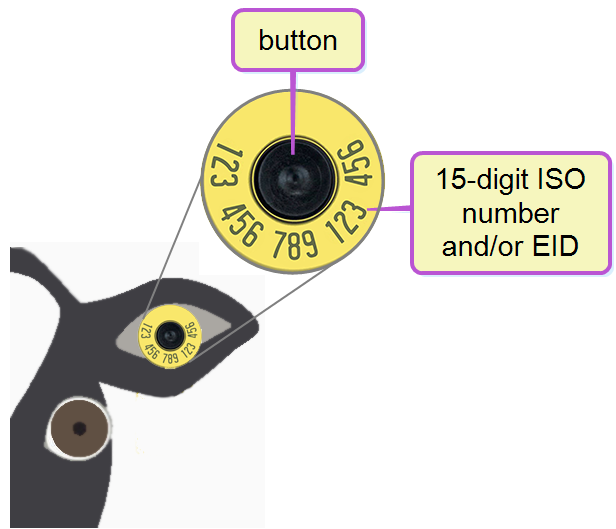
- IsoId: 15-digit ISO International Organization for Standardization, a global organization that promotes commercial and industrial standards. number associated with the animal eartag, often the same as the electronicID. If the electronicID changes, the isoId does not.
- ElectronicId: 15-digit electronic ID Identifier (EID 15-digit electronic ID number associated with the animal eartag) number associated with the electronic animal eartag, often the same as the IsoId. The EID of an animal changes whenever the button in the electronic tag is replaced:

- EnrollmentDate: Date the animal was added to the dairy
- ConceptionDate: Date of animal's conception
- DryDate: Date the cow was removed from milk production in the current lactation
- SireId: Animal's sire ID
- SireName: Common name of the animal's sire
- SireIsoId: 15-digit ISO ID of the animal's sire
- SireBreed: Two-letter abbreviation for the breed of the animal's sire. Common Cow breeds include the following: HO = Holstein; JE = Jersey; AY = Ayershire; BS = Brown Swiss; GS = Guernsey; MS = Milking Shorthorn; XB = Beef cross-breed; XD = Dairy cross-breedcross-breed
- SireStudCode: Semen company identification. For a listing of standard identifiers for the US, see NAAB Stud Codes.
- DamNumber: CowNumber assigned to the animal's dam
- DamName: Common name of the animal's dam
- DamIsoId: 15-digit ISO ID of the animal's dam
- DamBreed: Two-letter abbreviation for the breed of the animal's dam. Common Cow breeds include the following: HO = Holstein; JE = Jersey; AY = Ayershire; BS = Brown Swiss; GS = Guernsey; MS = Milking Shorthorn; XB = Beef cross-breed; XD = Dairy cross-breed
- SpeciesType: This value defaults to Cattle.
IMPORTANT: If you are not adding data for optional fields, leave them empty. Make sure the file extension remains XLSX. If you change the extension, the file upload will fail, resulting in an "Invalid File Type" error: